
Blur Photo – Easily Add Blur Effects to Images Online
In today’s digital world, images play a major role in communication. Whether you are posting on social media, creating thumbnails, or editing photos for professional use, sometimes you need to blur photo elements to improve focus, hide details, or create artistic effects.
Blurring is not just about aesthetics—it is also useful for privacy, storytelling, and visual clarity. With modern online tools, you no longer need advanced software to apply blur effects. You can now blur images instantly using simple web-based tools.
In this guide, we’ll explore how to blur photos, why it’s important, and how you can use online tools to achieve professional results.
What Does It Mean to Blur a Photo?
To blur photo means to reduce the sharpness of an image or specific part of it. This creates a soft, out-of-focus effect that draws attention to certain areas while minimizing distractions.
Blurring can be applied to:
- Backgrounds
- Faces
- Sensitive information
- Entire images
This technique is widely used in photography, design, and content creation.
Why People Use Blur Photo Effects
There are several reasons why people choose to blur photo content.
🎯 Focus on Subject
Blurring the background helps highlight the main subject of the image, making it stand out clearly.
🔒 Protect Privacy
You can blur faces, license plates, or personal details before sharing images online.
🎨 Creative Effects
Blur adds a professional and artistic touch to photos, especially in portraits.
📱 Social Media Enhancement
Blurred backgrounds make posts look more polished and engaging.
Types of Blur Effects
Different blur styles can be applied depending on your goal.
Background Blur
This is the most common type, where the background is softened while the subject remains sharp.
Gaussian Blur
A smooth blur effect applied evenly across an image or selected area.
Motion Blur
Creates a sense of movement, often used in action photography.
Radial Blur
Focuses on a central point and blurs outward.
Each type helps achieve a different visual outcome.
How to Blur Photo Online
Using an online tool is the easiest way to blur photo content without installing software.
Step-by-Step Process
- Upload your image
- Select the blur area (or entire image)
- Adjust the blur intensity
- Apply the effect
- Download the edited image
Most tools provide real-time previews so you can adjust the effect before finalizing.
Benefits of Using Online Blur Tools
Online tools offer several advantages over traditional editing software.
⚡ Fast and Easy
No need for complicated editing skills.
💻 No Installation Required
Works directly in your browser.
📱 Mobile Friendly
Edit photos from your phone or tablet.
💰 Free to Use
Many tools are completely free.
Blur Photo for Privacy Protection
One of the most important uses of blur photo tools is protecting privacy.
Before sharing images online, you can blur:
- Faces of people
- License plates
- Documents
- Addresses
This helps prevent misuse of personal information and ensures safer sharing.
Blur Photo for Social Media
Social media platforms are highly visual. A well-edited image can significantly increase engagement.
Using blur effects helps:
- Make profiles look professional
- Highlight key elements
- Create visually appealing posts
Many influencers and content creators use blur techniques to enhance their images.
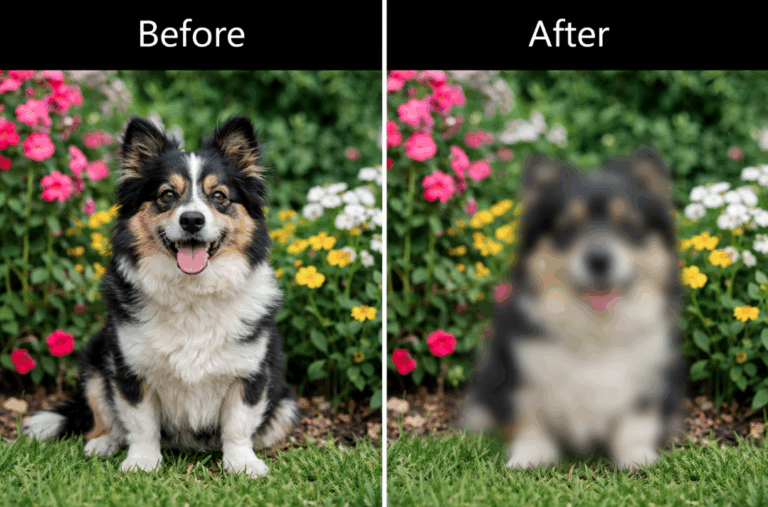
Blur Photo for Professional Use
Blur effects are widely used in professional fields.
Graphic Design
Designers use blur to create depth and focus.
Photography
Photographers use background blur to isolate subjects.
Marketing
Blur helps emphasize products and improve visual storytelling.
Tips for Better Blur Effects
To get the best results, follow these tips:
- Do not over-blur the image
- Keep the subject sharp
- Use high-quality images
- Adjust intensity carefully
- Preview before downloading
Balanced use of blur creates a natural and professional look.
Common Mistakes to Avoid
While blurring is simple, some mistakes can reduce quality.
- Overusing blur effect
- Blurring important details
- Using low-resolution images
- Applying uneven blur
Avoiding these mistakes ensures better results.
Blur Photo vs Sharp Image
Both blurred and sharp images have their uses.
| Feature | Blurred Image | Sharp Image |
|---|---|---|
| Focus | Highlights subject | Shows full detail |
| Privacy | Protects information | Reveals everything |
| Style | Artistic | Natural |
Choosing the right style depends on your purpose.
Best Use Cases for Blur Effects
Here are some common situations where blur photo tools are useful:
- Social media posts
- YouTube thumbnails
- Website banners
- Personal photos
- Professional portfolios
Why Online Blur Tools Are Popular
The popularity of online editing tools is growing rapidly because they are:
- Easy to use
- Accessible anywhere
- Free and fast
- Beginner-friendly
Users no longer need advanced software to edit images professionally.
Future of Photo Editing Tools
With advancements in AI and web technology, blur tools are becoming more powerful. Future tools may offer:
- Automatic subject detection
- One-click background blur
- AI-powered editing
- Real-time enhancements
This will make editing even easier and faster.
Conclusion
Using a blur photo technique is one of the easiest ways to enhance images, protect privacy, and create professional-looking visuals. Whether you are editing for personal use or professional projects, blur effects can significantly improve your photos.
With online tools, you can apply blur effects quickly without any technical knowledge. From social media posts to professional design work, blurring helps you control focus and create visually appealing images.
Start using a blur photo tool today and transform your images with just a few clicks.
❓ FAQs
What does it mean to blur photo?
Blurring a photo means reducing its sharpness to create a soft, out-of-focus effect.
Can I blur only part of an image?
Yes, most tools allow you to blur specific areas like the background or faces.
Is it free to blur photo online?
Yes, many online tools provide free blur features.
Why should I blur a photo?
You can blur images to improve focus, protect privacy, or create artistic effects.
Does blurring reduce image quality?
If used properly, it does not reduce quality significantly.
Can I blur photos on mobile?
Yes, most online tools are mobile-friendly and work on smartphones.
You May Follow: